Google+ PC Cracks,Tips, and Tricks

Friday, August 7, 2015

Free VPN Services

A private network is a network where access is limited – in most cases, it just means that the network can’t be found on the public Internet. A virtual private network is a private network that has been extended onto the public Internet, allowing users to connect to that private network from outside of that private network. This is often accomplished by setting up a connection point on the actual private network that relays information from the outsiders to the network and back to the outsiders.

Why use a VPN(Virtual Private Network)
  • VPN can break those geographical restrictions in World Wide Web. Thus allowing an Asian to check out Netflix or Hulu that are restricted to UK and US
  • You can get rid of stealthy hands when you access internet through public Wi-Fi or other  unsecured connections
  •  VPN can adds an extra layer of security while you browse the Internet.

Tuesday, December 9, 2014

Recover Lost data From Hard Drive


Now almost every data is digital from office work to personal files. What if you lose that data accidently. Your reaction like..."O man what I'm going to do!...","shit happen!....","My boss gonna kill me.....".
Relax buddy you can recover your lost data. With the help of data recovery softwares, it is possible to recover lost photos, videos, music, documents, images etc after deleting

Tuesday, October 21, 2014

Windows 10 - Key Features


Finally, the next iteration of Windows operating system is here! And, it’s called Windows 10, instead of the Windows 9 everyone had been expecting.Windows 10 appears to be a relief for most
of us mouse-keyboard users, who were highly disappointed with the largely unpopular Windows 8 UI.

Monday, September 29, 2014

Three Ways(Photshop & MS powerpoint) to Remove The Background of an Image

   Using Photoshop

Adobe Photoshop is an amazing software.It has number of tools which provide different ways to strip background from an image.Here we'll start with easy and simple method.

  Method 1.

 In this method we'll use following tools:-

 - Magic Wand Tool 
 - Background Eraser Tool

Wednesday, August 27, 2014

Useful Android Apps Which Connect PC With Device

There are many applications on Google Play Store.But only a few can connect Android device with PC easily.They are useful in many ways.You can Share your data with PC and Device with out using USB cable, use android device as mouse, shutting down system and etc.......

Sunday, April 27, 2014

How to Open a Webpage Using Notepad

Today we will going learn a new Notepad trick.In this trick we use notepad to open websites/webpages.

1.Open Notepad.

   All programs -> Accessories -> Notepad
                         OR
   (window + R) key,then type notepad
                         OR
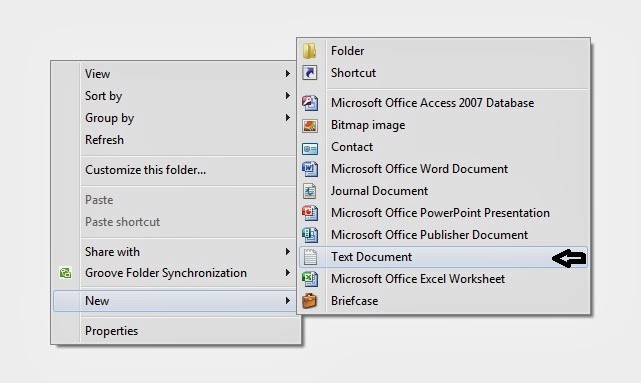
    Simply, Right click -> New -> Notepad.

Wednesday, April 16, 2014

5 Ways to Run Android Apps on PC


Everybody wants to run Android applications on their personal computer. 
Now, in PC world there are few Emulator which can run android applications.All these Emulator are open source you can download them for free.

Saturday, April 12, 2014

How To Remove Password Of Admin Account With CMD

In This Post we will learn how to remove password of Admin Account.This Trick needs CMD(Command Prompt).There are only few steps.


1.Open command prompt(cmd)
    windows button ->All program ->Accessories -> Command prompt.

Tuesday, March 25, 2014

Open The Notepad Continuously (With Pics)

In this Notepad trick,Notepad will open continuously again and again.It can be use as a virus.

1.Open Notepad.
Right Click and Select New

Sunday, March 2, 2014

How To Make an Invisible Folder (With pics)

Today we will learn how to make an invisible folder.So that you can hide anything in it.
Here are some steps to do the trick

1.Create a New Folder in any directory.
    Right Click->New->Folder, and a new folder is created.

Create a New Folder

Sunday, February 23, 2014

Solution For IDM Fake Serial key Pop Up

I am sure many of us are too much dependent on Internet Download Manager for downloading Videos,Songs,Programs...etc.
But IDM(Internet Download Manager) only provide us 1 month Trial period.
So,we start using fake serial numbers, keygen, crack, patch etc.
But, with the latest update version 6.18 Internet Download Manager was literally had a breakthrough and crushed all the serial numbers, keygens, cracks, patches. Even if they worked just for a little while, users were prompted every minute reminding,

                                  Internet Download Manager has been registered 
                                                    with a fake serial number.

Re-patching and reinstalling won't work any longer.

Tuesday, February 4, 2014

World Trade Center Attack Trick Or Code

►The flight number of the plane that had hit World Center Trade on  (9/11) was Q33NY. Now we  call this trick or a coincidence or something else but whatever it is you will be definately amazed by the this trick.

  1. Open Note pad and Type "Q33N"(without quotes) in Capital letters.
  2. Increase the font size to more than 48. 
  3. Change the Font to Wingdings.

Tuesday, January 21, 2014

Automatically Note The Time In NotePad

1... Open a blank Notepad file
2... Write .LOG as the first line of the file,press enter. Save the file and close it.
3... Double-click the file to open it and notice that Notepad appends the

       current date and  time to the end of the file and places the cursor on the
       line after.  
4...Type your notes and then save and close the file.
     
        ☺ This is useful for Daily Dairy ♫♪


Tuesday, January 14, 2014

Some Essential Shortcuts

 ☺Accessing Windows Features

Win+e                           :- Open My computer
Win+r                            :- Open Run window
Win+f                            :- Open Window Search
Win+F1                         :- Display Window Help
Shift when inserting         :- Prevent from automatically playing
                                              CD or DVD
Win+p                           :- Choose Presentation Display Mode
Win+l                            :- Lock the keyboard/ computer

Restart.....

Long Time No see......
Lets Start Again.......

Saturday, February 19, 2011

ATTRIB DOS COMMAND (With Pics)

Go to "run" and type "cmd'
About attrib


Attrib allows a user to change the properties of a specified file. Using attrib, the user has the capability of changing the file to have any of the below attributes. Note if you're wanting to change the ACL's of a file see the CACLS command.
Read-only - allowing the file to be only viewed and not written to.
Archived - allowing Microsoft backup and other backup programs to know what files to backup.
Hidden - making the file invisible to standard users.
System - making the file an important system file.

Show/Hide System Files and Folder using Windows Registry

This is an alternate method to show/hide system files and folders on a Windows PC. Most likely, you should use this simple method to do the same thing if you don't want to take risks modifying your registry.
IMPORTANT This article will guide to some steps to modify your Windows Registry. Stop if you're not familiar with the Windows Registry. Making a wrong change on the Windows Registry could cause critical problems to your computer.
Proceed at your own risks
1. Open the "Registry Editor" ("Start" >> "Run", then type "regedit" and Enter).
2. Expand to the following key:
HKEY_CURRENT_USER\Software\Microsoft\Windows\CurrentVersion\Explorer\Advanced
3. If the value "SuperHidden" exists, double-click on it to edit its value to (0 = show hidden, 1 = do not show)
4. If the value "SuperHidden" does not exist, create it as follows
Name: SuperHidden
Type: DWORD
Value: 0
(0: show hidden, 1: do not show)

Show/Hide System Files Using Registry 

Thursday, February 17, 2011

Make ur own Harmless Virus

Make Frnds scare for VIRUS

Open notepad and type the code below:

lol=msgbox ("Warning a virus has been detected on your PC. Press YES to format your hard disk now or press NO to format your hard disk after system reboot",20,"Warning")

Then save it as Virus.VBS

and go to the folder that contains it and open it if a window pops out saying a virus has been detected it's working. Press yes or no to close the window and put it in the startup folder of the victim's account.
On startup the window should appear.
Note: This does not harm your computer as it does not contain virus.

The Yes and no button does not do anything except closing the window. And you can edit the virus in the sentence: Warning a virus has detected on your PC to any kind of virus eg.Trojan Horse like this lol=msgbox ("Warning a Trojan horse has been detected on your PC. Press YES to format your hard disk now or press NO to format format your hard disk after system reboot",20,"Warning")
now hav fun !!☺○○○☺


Make Harmless Virus

Wednesday, February 16, 2011

Microsoft Word trick

Try out yourself...
Open Microsoft Word and type
=rand(200,99)
and then HIT ENTER....see what happens.
it won't hurt your system!!

MS Word Trick

How To Make A Folder With Name CON?

Did you ever tried to create a folder with name con or prn or nul? you cannot create a folder with names con , prn or nul in windows. but you can create folders with these names from dos with some special commands

to create a folder with name con in c just type this code in dos

md\\.\\c:\con